
MCP Server & Local CLI
The MCP server (lensword-mcp, stdio by default) for AI clients like Claude, Codex, or Cursor, and the local CLI (lensword, a bounded, offline context-preview command plus a few commands that act on your account through the same policy-gated boundary) are two independently-versioned Python packages: apps/mcp and apps/cli (split in issue #311 — they used to share one apps/mcp package with two entry points). apps/mcp now depends on apps/cli for the HTTP client the two share. Neither is published to PyPI yet — install is source-only, though a PyPI publish workflow now exists for the CLI; see "PyPI publishing (not yet live)" below. Everything else on this page was verified in an earlier documentation pass against the actual installed package, before the split — re-verified in this pass only where the split itself changed something (package/module locations, install commands); the protocol-level and CLI-behavior claims below were not independently re-run today.
Confirmed package details
| Package names | lensword-mcp (apps/mcp/pyproject.toml, MCP server) and lensword-cli (apps/cli/pyproject.toml, Local CLI) |
| Version | 0.1.0 for both |
| Python requirement | >=3.11 for both — confirmed by testing: a clean install of both packages on Python 3.12 in a fresh virtualenv succeeded with zero dependency-resolution issues; <3.11 was not attempted against the enforced constraint |
| Third-party dependencies | apps/cli has none — pyproject.toml declares no [project.dependencies], and its source uses only urllib, json, and other standard-library modules. apps/mcp depends on lensword-cli==0.1.0 (the shared BackendClient/BackendError HTTP client) — resolved from a sibling source install, not PyPI, until lensword-cli is actually published there |
| Entry points | lensword-mcp → lensword_mcp.server:main (MCP server, apps/mcp); lensword → lensword_cli.cli:main (local CLI, apps/cli) |
| Transports | stdio (default, always available); Streamable HTTP (off unless explicitly enabled both sides — see MCP remote transport) |
| MCP protocol versions | 2025-06-18 and 2025-11-25 — confirmed by testing: an initialize call with an older version (2024-11-05) was rejected with a JSON-RPC error naming exactly these two supported versions |
| Install method | pip install -e apps/cli -e apps/mcp from source (see below); not on PyPI |
Quick start
Prerequisites
A running LensWord server (the Getting Started Compose stack works) and an access token for your account — the same token the web app uses, not a separate MCP-specific credential. The MCP CLI has no login flow of its own, so get the token the safest way available: log into the web app, open DevTools → Application → Local/Session storage (or the Network tab on any authenticated request) and copy the access token your own session is already using, rather than typing your password anywhere else.
Install
pip install -e apps/cli -e apps/mcpConfirmed in this pass: this succeeds cleanly in a fresh Python 3.12 virtualenv — apps/mcp's dependency on apps/cli (lensword-cli==0.1.0) resolves against the sibling editable install above rather than reaching out to PyPI, since neither package is published there yet. Installing only apps/cli (pip install -e apps/cli) also works on its own if you only want the lensword CLI, not the MCP server.
Configure a client (stdio)
Every MCP client that supports a stdio server config needs the same three things: a command, and three environment variables.
{
  "mcpServers": {
    "lensword": {
      "command": "lensword-mcp",
      "env": {
        "LENSWORD_API_URL": "http://localhost:18420",
        "LENSWORD_TOKEN": "<your access token>",
        "LENSWORD_MCP_WORKSPACE": "/approved"
      }
    }
  }
}
This is the config shape Claude Desktop, Cursor, and VS Code's MCP support all use (mcpServers object, command + env) — confirmed by lensword-mcp's own env-var contract, which is client-agnostic by design. Not independently confirmed in this pass: actually connecting a live Claude Desktop, Cursor, or VS Code instance to it — this documentation session didn't have any of those clients available to test against. What was verified directly is everything the client would see on the other end of that config: the process starts, speaks the protocol version above, and responds to initialize and tools/list exactly as shown below.
Never commit this config with a real token in it. Treat LENSWORD_TOKEN in any client config file the same as a password — most MCP clients store this config in a local, unencrypted JSON file.
Restart and confirm discovery
Most MCP clients only read their config file at startup — restart the client after editing it. To confirm discovery worked without opening a client at all, the same handshake can be run directly:
echo '{"jsonrpc":"2.0","id":1,"method":"initialize","params":{"protocolVersion":"2025-06-18","capabilities":{},"clientInfo":{"name":"test","version":"0"}}}' | LENSWORD_API_URL=http://localhost:18420 LENSWORD_TOKEN=$TOKEN LENSWORD_MCP_WORKSPACE=/approved lensword-mcpVerified in this pass: this exact handshake, run against a real running backend, returned serverInfo: {"name": "lensword", "version": "0.1.0"} and capabilities for tools, resources (with subscribe: true), prompts, and completions. A follow-up tools/list call returned 26 real tools (lensword_add_word, lensword_search_words, lensword_get_due_reviews, lensword_create_study_session, and 22 more — the exact list matches TOOL_CONTRACTS in apps/backend/app/application/mcp/contracts.py, which is the single source of truth this server proxies to).
First action: a read-only tool call
Before any write-capable workflow, confirm a read-only call reaches the policy gate correctly:
{"jsonrpc":"2.0","id":2,"method":"tools/call","params":{"name":"lensword_search_words","arguments":{"query":"","limit":5}}}Verified in this pass, against a token with no grants issued yet, this returns {"isError": true, "content": [{"type": "text", "text": "no_grant"}]} — the deny-by-default MCPPolicyGate refusing an ungranted tool, not a crash or a silent success. This is the expected first response for any fresh setup; granting access happens through the same flow described in the AI Companion guide.
A real bug found and fixed during this verification pass
The first attempt at the read-only call above didn't return no_grant — it failed with "unsupported payload field: request_id". Tracing it down: server.py's BackendClient.invoke() unconditionally attaches a request_id to every tool call's payload, for every tool, read or write. But contracts.py only declares request_id as a valid property on write-class tool schemas (it's the write-idempotency key, issue #196 TODO 4) — so its strict "reject unknown properties" validator rejected request_id outright on every read-class call, even though the /api/v1/mcp/invoke route handler's own logic already treats request_id as optional-and-ignored for reads. The validator's behavior contradicted the route handler's own design intent, and broke every read tool called through apps/mcp.
Fixed in apps/backend/app/application/mcp/contracts.py's validate_payload() to always allow request_id, matching what the route handler already assumed. Verified the fix: rebuilt the backend container, re-ran the identical call (now correctly reaches the policy gate instead of failing validation), then ran the full test suite — 85/85 MCP-specific backend tests, 124/124 apps/mcp tests, and 1894/1902 of the full backend suite pass (the 8 failures are pre-existing test_ollama_provider.py integration tests that need a real local Ollama daemon this environment doesn't have running — unrelated to this change).
The local CLI
Five subcommands, confirmed via lensword --help against the installed package: import-context, add, explain, diagnose, review.
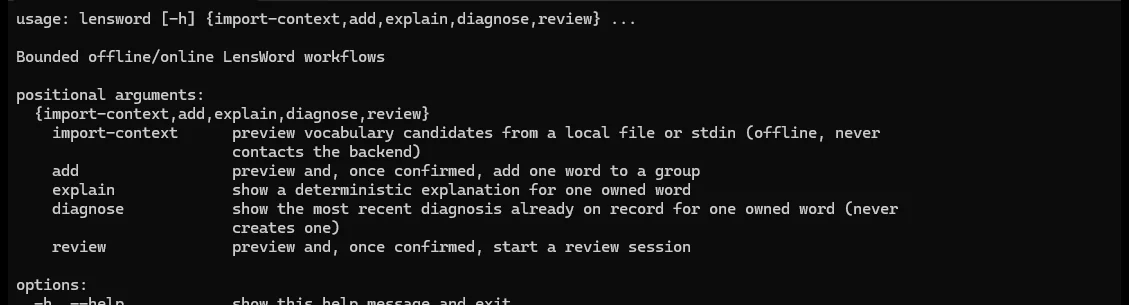
Real terminal output from the installed package, not a transcript typed by hand.
import-context — offline, never contacts the backend
lensword import-context --file README.md --json
cat terminal-output.txt | lensword import-context --stdin --source-ref terminal-session
Verified directly in this pass:
- Real file and stdin input both produce ranked JSON candidates with
occurrences,technical_relevance, andsource_kind/source_reffields — confirmed against this repository's ownREADME.md. writes_performed: falseon every response — confirmed structurally present, matching the documented never-writes guarantee.- Secret redaction, tested with a fake API key and password in stdin input: the credential values never appeared as candidates, while the surrounding identifier names (e.g. a variable named
GOOGLE_VERTEX_API_KEY) still did — redaction targets secret values specifically, not every line touching something security-sounding. - Size refusal, tested with a 60,000-character file against the 50,000-character default: refused with exit code
3and a message naming the exact override flag (pass --allow-truncate to continue). With--allow-truncatesupplied, it proceeds and truncates rather than refusing. - JSON output is the
--jsonflag's contract; without it, output is human-readable text (not independently re-verified in this pass beyond confirming the flag exists in--help).
add, explain, diagnose, review — contact the backend
These use the same policy-gated /api/v1/mcp/invoke boundary the MCP server uses — they are not a separate, looser path. explain and diagnose are read-only; diagnose specifically never triggers a new diagnosis, it only shows the most recent one already on record. add and review preview what they're about to do and require explicit confirmation (y/yes interactively, or --yes) before writing anything — not independently re-verified against a live backend beyond what apps/cli's own test suite (43 tests, all passing as of the package split in #311) covers structurally.
Security, privacy, and the trust boundary
This page covers installation and protocol-level verification. For the full permissions/scopes model, privacy behavior (export, deletion, revocation, audit), prompt-injection handling for imported repository text, and an honest per-host compatibility matrix, see the AI Companion guide — it's the canonical source for that material and this page doesn't duplicate it.
One point worth restating here specifically: never commit a LENSWORD_TOKEN value into an MCP client config file that gets checked into version control. Most MCP clients read config from a plain JSON file with no encryption; treat it exactly like a .env file with real credentials in it.
Remote transport
The MCP server also supports Streamable HTTP, off by default and gated on both the server and the backend. See MCP remote transport for what's on by default, TLS requirements, and what has and hasn't been tested end to end.
PyPI publishing (not yet live)
A PyPI publish workflow for the Local CLI exists (.github/workflows/publish-cli.yml, issue #311) but has not been triggered — no cli-v* tag has been pushed, and the repo owner has not yet configured a PyPI trusted publisher for the not-yet-existing lensword-cli project. pip install lensword-cli and pipx install lensword-cli do not work yet — the install commands on this page (pip install -e apps/cli -e apps/mcp) remain the only working path. See docs/internal/pypi-publishing.md for the setup the repo owner still needs to do, and what was and wasn't verified about the workflow itself.
Verification summary
| Check | Result |
|---|---|
| Clean install (Python 3.12, fresh venv) | Passed |
| Python version constraint | Both packages require >=3.11; not tested against a <3.11 interpreter |
apps/mcp's dependency on apps/cli resolves from a sibling source install, not PyPI | Passed — confirmed with pip install -e apps/cli -e apps/mcp in a fresh venv |
lensword-mcp starts, rejects missing env vars | Passed — exits 2, names the exact 3 missing vars |
MCP protocol handshake (initialize) | Passed — correct version accepted, wrong version rejected with the supported list named |
Tool discovery (tools/list) | Passed — 26 real tools returned |
| Read-only tool call, ungranted | Passed — correctly denied (no_grant), not a crash |
| Write-shaped tool call, ungranted | Passed — correctly denied (no_grant) |
| Real MCP client connection (Claude Desktop/Cursor/VS Code) | Not run — no client available in this environment |
import-context file/stdin | Passed |
| Secret/credential redaction | Passed |
Oversized-input refusal + --allow-truncate | Passed |
add/explain/diagnose/review against a live backend | Not independently re-verified beyond apps/cli's own test suite (43/43 passing) |
| Malformed protocol message handling | Not run |
apps/mcp's Docker image builds with the new apps/cli dependency | Passed — built successfully against the updated render.yaml build context/Dockerfile; container still exits 2 on missing env vars |
publish-cli.yml actually publishing to PyPI | Not run — no trusted publisher configured yet (see "PyPI publishing" above) |
See docs/internal/repo-audit.md for the broader evidence base this page draws from, and Choose your surface for how this compares to the other ways to use LensWord.