
Browser Extension
LensWord Capture (apps/browser, Chrome MV3) saves text you select on any webpage straight into a LensWord vocabulary group via a right-click context menu. Choose it when you want to capture words while reading elsewhere on the web, rather than typing them into LensWord by hand afterward.
It's real and functional today, but developer-mode only: no official package is published anywhere, install is a manual "Load unpacked," and there is zero CI coverage for this surface. Everything on this page was verified directly against the current source and, where noted, against a real running backend — not written from the manifest alone.
Confirmed extension details
| Manifest version | 3 |
| Extension version | 0.1.0 (manifest.json) |
| Supported browsers | Chromium-based (Chrome; Edge/Brave/Opera share the same extension platform but were not individually tested) |
| Firefox | Not supported/not tested. No browser_specific_settings, and MV3 API coverage differs enough between Firefox and Chromium that compatibility isn't assumed either way |
| Permissions (fixed) | contextMenus, storage, notifications |
| Permissions (optional, granted at sign-in time) | optional_host_permissions: ["http://*/*", "https://*/*"] declared in the manifest as the possible universe — but the actual runtime grant requested via chrome.permissions.request() is narrowed to just the origin of the build's fixed API URL (see API URL below), not a blanket grant |
| Popup | Email + password sign-in, then a group dropdown; reads/writes chrome.storage.local (the access token and chosen group, never the password) |
| Context menu | One item, contexts: ['selection'] — only appears when text is selected, never injected unconditionally |
| Backend call | POST {API_URL}/api/v1/groups/{groupId}/words with Authorization: Bearer {token}, body { term, target_language: "Spanish", translations: [] } |
| Default target language | Hardcoded "Spanish" — saving into a group with a different target language still succeeds (the backend doesn't cross-check word language against group language), so the saved word's language tag won't match a non-Spanish group |
| Packaging/release state | No package published anywhere (Chrome Web Store or otherwise); source-only |
API URL
The backend URL is not a field in the popup — it's a fixed value baked into config.js at build time from one of two committed env files (apps/browser/.env.local → http://localhost:18420 for development, apps/browser/.env.production → the hosted production API for a release build). Run npm run build:debug or npm run build:release inside apps/browser before loading the extension; config.js is generated output (gitignored), and both popup.js and service-worker.js fail to load without it since they import the API_URL constant from it.
First-success guide
1. Build config.js and load the unpacked extension
cd apps/browser && npm run build:debug(usenpm run build:releaseinstead to point the extension at the hosted production API rather than a local backend — see API URL above). This step is required: the popup and service workerimporttheAPI_URLconstant from the generatedconfig.jsand fail to load without it.- Open
chrome://extensions. - Enable Developer mode (top right).
- Click Load unpacked and select the
apps/browserfolder.
There is no packaged/store build to install instead — see Packaging state below for exactly why and what a package would look like if you build one yourself.
2. Sign in
Open the extension's popup (click its toolbar icon):
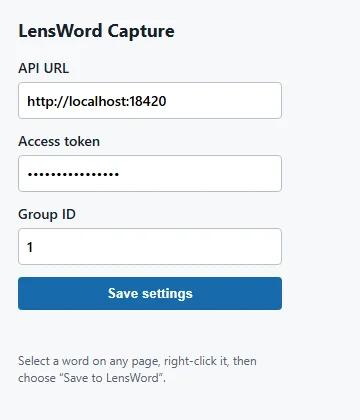
Shown rendered standalone (popup.html opened directly), not loaded as an extension — chrome:// pages are outside this documentation's browser automation, see Verified capture flow below. This screenshot predates the sign-in flow described here and needs regenerating — don't take its exact fields as current.
Enter the email and password of your LensWord account and click Sign in. This triggers a Chrome permission prompt for the build's fixed API origin — this is chrome.permissions.request() asking for exactly that origin, not a broad grant. Accepting it is required; the extension can't reach your server without it.
Once signed in, pick which group captures should be saved into from the Save words into dropdown — it's populated from your account's actual groups (GET /api/v1/groups), not a number you have to go find in a URL. Only your access token is stored (chrome.storage.local); your password is sent once to the login endpoint and never persisted.
3. Capture a word
- Select text on any webpage.
- Right-click the selection → Save "…" to LensWord.
- A native notification confirms the save (or explains what went wrong — including a specific "session expired, sign in again" notification, kept distinct from other failures, if your token has expired).
- Open the group in the LensWord web app to see the word, then enrich it (translation, example sentence, mnemonic) there — the extension only captures the term itself.
Verified capture flow
chrome:// pages and native OS-level context menus aren't things this documentation pass's browser automation tooling can drive, so the full flow — sign-in, group selection, and the right-click capture itself — was verified with a manual click-through in a real (non-automated) Chrome window with the unpacked extension loaded, rather than a scripted run. Confirmed against the backend's own access log: a successful POST /api/v1/auth/login, a GET /api/v1/groups, and two separate 201 Created responses from POST /api/v1/groups/{id}/words — one per captured selection.
The exact requests popup.js and service-worker.js make were also reproduced directly against the API, to pin down the failure-path responses a live click-through wouldn't deliberately trigger:
curl -X POST "http://localhost:18420/api/v1/auth/login" \
  -H "Content-Type: application/json" \
  -d '{"email":"you@example.com","password":"..."}'
# → HTTP 200, {"user": {...}, "token": {"access_token": "...", "token_type": "bearer"}}

curl -X POST "http://localhost:18420/api/v1/groups/1/words" \
  -H "Content-Type: application/json" \
  -H "Authorization: Bearer $TOKEN" \
  -d '{"term":"la ventana","target_language":"Spanish","translations":[]}'
# → HTTP 201, full word object returned
Failure paths were verified the same way:
| Scenario | Result |
|---|---|
| Invalid/expired token | 401 {"detail":"Could not validate credentials"} |
| Nonexistent group ID | 404 {"detail":"Group '99999' was not found"} |
Both messages are specific enough to act on and don't leak anything beyond what the request itself already implied — matching the verification matrix's "failure states are understandable and do not leak secrets."
A real bug was found and fixed during this pass: all three chrome.notifications.create() calls in service-worker.js referenced iconUrl: 'icon.svg'. Chrome's notifications API does not support SVG icons (confirmed against Chrome's own extension documentation and a reported "Unable to download all specified images" failure for the same pattern) — every capture notification would have shown with a missing or broken icon. Fixed to reference the PNG icon set added in the brand-assets work (icons/icon48.png).
Security & privacy
- Page content is read only after you explicitly select text and choose "Save to LensWord" from the context menu. The content script/menu is scoped to
contexts: ['selection']— there is no background scanning, no automatic capture, and no access to page content outside that explicit action. - Host permission is limited to the build's fixed API origin, not every site. The manifest declares a broad optional permission (
http://*/*,https://*/*) because a static manifest can't reference the value baked intoconfig.jsat build time, but the actual grant Chrome asks you to approve — viachrome.permissions.request({ origins: [origin] })inpopup.js— is computed from that fixedAPI_URL, and nothing broader is ever requested. - Token storage: your access token is stored in
chrome.storage.local— local to this browser profile, not synced to Google's servers the waychrome.storage.syncwould be, and not exposed to web pages. Your password is never stored; the popup sends it once toPOST /api/v1/auth/loginand keeps only the resulting token. - Signing in still carries the same underlying risk a bearer token always did: the resulting token has the same reach as your normal login session until it expires or is revoked. The popup's own storage is local-only and not exposed to web pages, but the token itself is still a live credential — treat a compromised device the same way you would a leaked password.
- Logout/revocation: click Sign out in the popup to clear the stored token, chosen group, and email from
chrome.storage.local. Separately invalidate the token server-side if you're concerned it was exposed — sign-out here only forgets local state, it doesn't revoke the token on the backend. - Tenant ownership is enforced server-side, not by the extension. The extension merely sends a bearer token; every authorization decision (does this token's owner have write access to this group?) happens in the backend, the same as any other API client. The extension proves nothing about backend security on its own — it's a thin client over the same authenticated API the web app uses.
Packaging and compatibility
There is a single build step — generating config.js (see API URL above) — everything else is plain static files with no bundler. A distributable package is a zip of the source after that build step, using the release config:
cd apps/browser
npm run build:release
zip -r -X lensword-capture-0.1.0.zip . -x ".*" -x "node_modules/*" -x ".env.local" -x ".env.production"
shasum -a 256 lensword-capture-0.1.0.zip
(PowerShell equivalent: Compress-Archive -Path * -DestinationPath lensword-capture-0.1.0.zip.)
Zipping without running npm run build:release first produces a package missing config.js entirely — popup.js and service-worker.js both import from it and fail to load. The hash of any given build's zip depends on its exact source and config.js contents, so no fixed hash is recorded here — compute it yourself against what you actually built.
This zip is for sideloading/manual distribution only — it is not what the Chrome Web Store expects for a store listing (which has its own review and packaging process this project hasn't gone through), and there is no official artifact of any kind published today. Don't conflate "I built a zip" with "this is published" — nothing here is.
Troubleshooting
- Context-menu item doesn't appear — it only shows when text is selected (
contexts: ['selection']); right-click without a selection and it won't be there. Reload the extension fromchrome://extensionsif it's missing even with text selected. - Popup fails to load / console shows an import error for
./config.js— you loaded the extension without runningnpm run build:debug(orbuild:release) first; see API URL above.config.jsis gitignored generated output, not something checked into the repo. - Extension can't reach the API — check you accepted the permission prompt when signing in; without a granted host permission, every request is blocked by Chrome before it leaves the browser. The API URL itself isn't user-editable — if it's wrong, rebuild
config.jsfrom the correct env file (.env.localvs.env.production) and reload the extension. - Invalid/expired token — capture fails with a distinct "LensWord session expired" notification (the extension detects this itself and clears the stored token); open the popup and sign in again.
- No groups in the dropdown — the popup shows "You have no groups yet" and disables the dropdown; create a group in the LensWord web app first, then reopen the popup.
- Host permission rejected — if you decline the Chrome permission prompt at sign-in, the sign-in itself fails (the popup shows an error) and no capture will work until you sign in again and accept it.
- HTTPS/CORS/origin mismatch — the extension calls the API directly from the service worker, not from a page context, so browser CORS enforcement doesn't apply the same way it does to the web app; a self-hosted server over plain HTTP works for the extension even though browsers increasingly restrict mixed content elsewhere. This is a narrower attack surface than the web app's CORS story, not a stricter one — don't assume HTTPS is enforced here just because it matters elsewhere in this project.
- Word created but translation/enrichment missing — expected. The extension only ever sends
term, hardcodedtarget_language: "Spanish", and emptytranslations. Open the word in the web app or MnemoLab to add a translation, example sentence, or mnemonic. - Browser doesn't support the declared manifest/features — this is an MV3 extension; browsers without MV3 support (old Chrome versions, or browsers that never adopted it) can't load it at all. Not tested against any specific minimum Chrome version.
See docs/internal/repo-audit.md for the evidence behind this surface's overall release status, and Choose your surface for how it compares to the other ways to use LensWord.