
Desktop application
LensWord has a desktop shell (Tauri 2) under apps/desktop/. It hosts the same frontend build as the browser version and talks to a LensWord server over the network — ADR 0002 decided the first release is remote-only, so the app does not bundle a database or a Python runtime and needs a server to point at.
When to choose Desktop instead of Web
Choose the Web Application unless you specifically want: a native window separate from your browser, an OS-level credential store instead of browser storage for your session token, or (once verified — see below) native desktop notifications. Desktop still needs a LensWord server reachable over HTTPS or loopback; it does not work offline or without one, and — since no release has shipped — it currently means building from source yourself rather than downloading an installer.
Confirmed architecture
Checked directly against the source and lockfile, not assumed from the README:
- Tauri version:
2.11.5(apps/desktop/Cargo.lock), API surfacetauri = { version = "2", features = ["tray-icon"] }. - Frontend embedding: the shell's
beforeBuildCommandbuildsapps/frontendand Tauri'sfrontendDistpoints at../../frontend/dist— the desktop app ships the exact same web build as the browser surface, not a separate UI. - Backend mode: remote-only, no bundled database or Python runtime (ADR 0002).
- Endpoint resolution order:
LENSWORD_API_URLenv var, then anapi-endpointfile in the OS application-config directory, then a compiled-in default. Must be loopback orhttps://— plain HTTP to a remote host is refused at the Rust layer, not just discouraged. The compiled-in default ishttp://127.0.0.1:8000for a local build (cargo tauri dev/cargo build); a CI-built release installer (see below) instead defaults to the hosted production API,https://lensword-api.conectlens.com— set at compile time (apps/desktop/api-config/src/lib.rs'sDEFAULT_API_BASE), not something the running app reads from its environment. Either way, the two runtime layers above still take precedence, so a downloaded installer remains fully usable against a self-hosted backend. - Credential storage: the
keyringcrate (apps/desktop/src-tauri/Cargo.toml) — OS Keychain on macOS, Credential Manager on Windows, Secret Service on Linux — not webviewlocalStorage. - Notifications: polled from the backend and raised as native toasts via
tauri-plugin-notification/notify-rust/tauri-winrt-notification, with Start / Remind later / Skip today actions. - Auto-update: not configured.
tauri.conf.jsonhas no updater plugin entry — there is no in-app update mechanism; a new version means downloading a new installer once releases exist. - Signing: fully optional, driven by repository secrets documented in Releasing & compatibility. Unconfigured by default, which is the current state — every artifact discussed below is unsigned.
Install
A GitHub Actions workflow builds installers for all three platforms — .dmg for macOS, .msi/.exe for Windows, .deb/.AppImage for Linux — and attaches them to a GitHub release as a draft whenever a desktop-v* tag is pushed, a specific, deliberately cut version (see Release process § Release channel). There used to be a second "continuous build" channel that republished installers automatically on every push to main; it was removed for publishing without any review step.
Until a release has been published from a draft, every platform means building from source below. A downloaded installer's artifacts are unsigned unless the repository's signing secrets are configured — macOS will show a Gatekeeper warning and Windows a SmartScreen one. See Releasing & compatibility.
All three need a Rust toolchain (rustup) and the platform's webview development packages from the Tauri prerequisites page, then:
(cd apps/frontend && npm ci && npm run build)   # the shell embeds this build
(cd apps/desktop && npx @tauri-apps/cli@2 build)
The artifact lands under apps/desktop/target/release/bundle/.
macOS
- Prerequisites: Xcode Command Line Tools, plus the shared Rust/Node steps above.
- Official artifact: none yet (see note above).
- Signing/notarization: unconfigured by default; unsigned builds trigger a Gatekeeper warning ("cannot be opened because the developer cannot be verified"). Right-click → Open bypasses it once; there's no notarization ticket to check.
- Headless/SSH builds: the
.dmgpackaging step ends with an AppleScript that needs a GUI session. AddCI=1when building over SSH or from a headless process, or the build hangs waiting for a desktop that isn't there. - Install/uninstall: drag the
.appfrom the mounted.dmginto/Applications; uninstall by deleting it. Keychain entries this app created are not removed automatically — see Troubleshooting. - Verification status: Unavailable in this documentation pass — written and verified from a Windows environment; no macOS host was available to build or run on. Every macOS-specific claim above is sourced from
tauri.conf.json, the CI workflow, and the Tauri docs, not from an observed build.
Windows
- Prerequisites: the MSVC Rust toolchain (
rustup default stable-x86_64-pc-windows-msvc) and Visual Studio Build Tools (the C++ linkercargo buildneeds), plus the shared Node steps above. WebView2 is preinstalled on current Windows 10/11. - Official artifact: none yet.
- Signing: unconfigured by default; unsigned
.msi/.exeinstallers trigger a SmartScreen "Windows protected your PC" warning. "More info" → "Run anyway" bypasses it once per binary. - What was actually verified here (Windows 11, this documentation pass):
cargo checkandcargo buildboth succeed against the current source — real compilation, not assumed.The resulting debug binary (
apps/desktop/target/debug/lensword-desktop.exe, 24.8 MB unsigned, confirmedNotSignedviaGet-AuthenticodeSignature) launches successfully and renders the same landing page as the web app inside a native window — captured directly from the running process, not a mockup: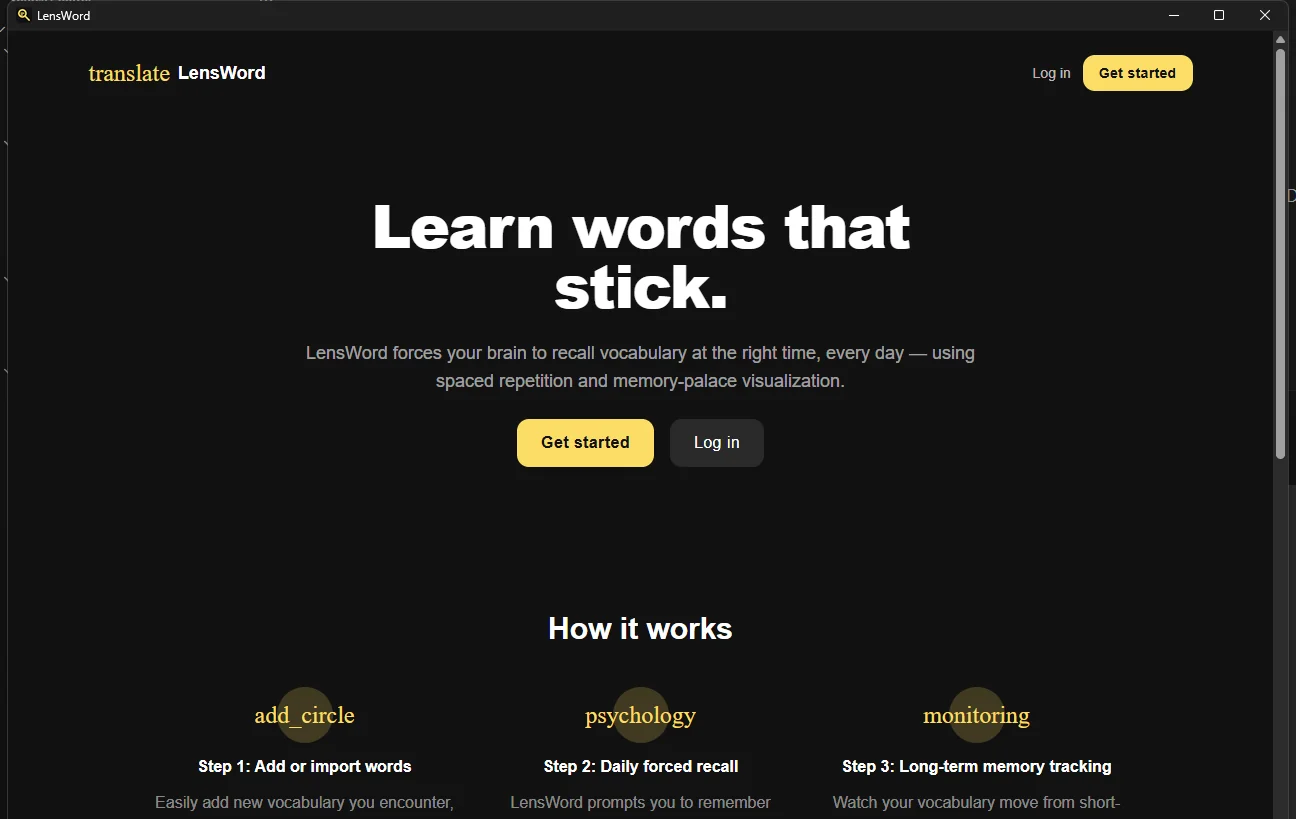
The full
tauri build(which also produces the actual.msi/.exeinstaller via itsbeforeBuildCommand) failed in this environment at thenpm --prefix ../../frontend cistep Tauri's CLI shells out to — while the equivalent command run directly (npm --prefix apps/frontend ci) succeeds on its own. This looks like an environment-specific argument-passing quirk in how@tauri-apps/cliinvokes that command on Windows, not a defect in the application code; it was not further chased down. The installer bundling step itself remains unverified — only the underlying Rust compilation and the resulting binary's ability to launch and render are confirmed.
- Uninstall: no installer was produced to test uninstall behavior; not verified.
Linux
- Prerequisites:
webkit2gtk,libayatana-appindicator(for the tray icon), and the rest of the Tauri Linux prerequisites; the shared Rust/Node steps above. - Official artifact: none yet. CI (
ci.yml'sdesktopjob) does build and test the shell onubuntu-latest, which is the strongest platform-coverage evidence that exists today — but that's a CI compile+test pass, not a manually observed install/launch/uninstall cycle on a real Linux desktop. - Signing/notarization: not applicable to
.deb/.AppImagein the way it applies to macOS/Windows; neither format is signed here. - Verification status: Unavailable in this documentation pass — same constraint as macOS; no Linux desktop host was available. CI compiling and running the Rust test suite on
ubuntu-latestis real evidence the code builds on Linux; it is not evidence a packaged.deb/.AppImageinstalls and runs correctly on a real desktop.
Sign-in, sign-out, and credentials
First launch shows the same landing page as the web app (confirmed on Windows, above) with Get started / Log in. Signing in stores the resulting token in the OS credential store rather than browser storage — signing out is expected to clear it, though the clear-on-logout path was not independently re-verified in this pass beyond what the unit test suite already covers.
Platform verification matrix
Passed means manually observed in this environment during this documentation pass. Unavailable means the platform wasn't reachable from here, not that it's known to fail. Compilation succeeding is never reported as functional verification, per the source issue's own instruction.
| Check | macOS | Windows | Linux |
|---|---|---|---|
Compiles (cargo check/cargo build) | Unavailable | Passed | Passed in CI (ci.yml, ubuntu-latest) |
Installer artifact built (tauri build) | Unavailable | Failed — see Windows notes above | Not run here (CI doesn't produce a bundle) |
| Checksum captured | Unavailable | Not applicable (no installer produced) | Not applicable |
| Signature checked | Unavailable | Not applicable (no signed artifact exists) | Not applicable |
| Notarization checked | Unavailable | Not applicable | Not applicable |
| Fresh install | Unavailable | Not run (no installer) | Unavailable |
| First launch | Unavailable | Passed — screenshot above | Unavailable |
| Authentication | Unavailable | Not run | Unavailable |
| Credential persistence / logout cleanup | Unavailable | Not run | Unavailable |
| Core review workflow | Unavailable | Not run | Unavailable |
| Room drag/drop | Unavailable | Not run | Unavailable |
| Mind map | Unavailable | Not run | Unavailable |
| Native notification display | Unavailable | Not run | Unavailable |
| Notification actions | Unavailable | Not run | Unavailable |
| Upgrade behavior | Unavailable | Not applicable (no prior release to upgrade from) | Unavailable |
| Uninstall / leftover process/config | Unavailable | Not run | Unavailable |
| Startup/memory/installer-size baseline | Unavailable | Not run — scripts/desktop-baseline.py exists for this but requires a packaged build, which wasn't produced here | Unavailable |
Every Not run/Unavailable row above is a real gap, not a formality — interactive desktop-window testing (clicking through auth, review sessions, drag/drop) needs GUI automation tooling this documentation pass didn't have available, on top of the macOS/Linux host access gap. See docs/internal/repo-audit.md for the audit this matrix is consistent with, and issue #65 for the tracked work to close the signed-build baseline gap specifically.
Troubleshooting
- App can't connect to the server — check
LENSWORD_API_URL, or theapi-endpointfile in your OS's app-config directory, points at a reachable server. See Endpoint resolution order above. - "Refused" connecting to a remote server over HTTP — expected. The shell only accepts loopback addresses or
https://origins; a self-hosted server needs real TLS in front of it (see Self-Hosting & Deployment § TLS and origins). - Linux: build fails looking for webview/appindicator libraries — install
webkit2gtkandlibayatana-appindicator(exact package names vary by distro) per the Tauri Linux prerequisites before building. - macOS: "app can't be opened because the developer cannot be verified" — expected for every current build; no release is signed. Right-click the app → Open, once, to bypass Gatekeeper for that binary.
- Windows: SmartScreen blocks the installer, or credential storage fails — SmartScreen is expected for the same reason as macOS's Gatekeeper warning above. Credential-store failures haven't been observed or triaged in this pass; if a specific error surfaces, check that Windows Credential Manager is reachable (unusual to be blocked, but possible under strict Group Policy).
- No native notification ever appears — this has never been observed on any real OS build (see the verification matrix above); treat it as implemented-and-unverified, not broken, but don't expect it to work on an unsigned local build either.
- Building the
.dmghangs over SSH — the packaging step needs a GUI session for an AppleScript step; setCI=1when building headless. - Stale endpoint or credentials after switching servers — clear the
api-endpointfile in the OS app-config directory and the app's keychain/credential-manager/secret-service entry, then relaunch and log in again; there's no in-app "reset connection" control today.
See docs/internal/evidence-gaps.md for the standing gap this matrix leaves open (no installer has ever been run on any OS) and docs/reference/releasing.md for how a real release, once cut, should be verified.